Your Team Uses AI. Your Business Still Doesn't.
Why most small businesses remain stuck between AI experiments and operational automation, plus a practical maturity model and 30-day plan for closing the integration gap.
Posted by
 Jet
JetRelated Reading
How AI Finds Wasted Ad Spend Before Your Marketing Team Does
A practical AI ad audit playbook for SMBs, SaaS teams, and digital businesses: find wasted spend, diagnose creative fatigue, catch landing page mismatch, and turn ad reports into weekly optimization briefs.
7 AI Automation Tasks for Small Business Owners in 2026
A practical 2026 guide for small business owners: seven repetitive tasks to automate with AI, with workflows, tool stacks, examples, and a 30-day rollout plan.
Your AI Agent Demo Looks Impressive. What Workflow Disappears?
Most AI agent demos automate fake work. Real AI automation replaces an existing business workflow across revenue, delivery, or operations, with clean data, human approval, CRM feedback, and repeatable execution.
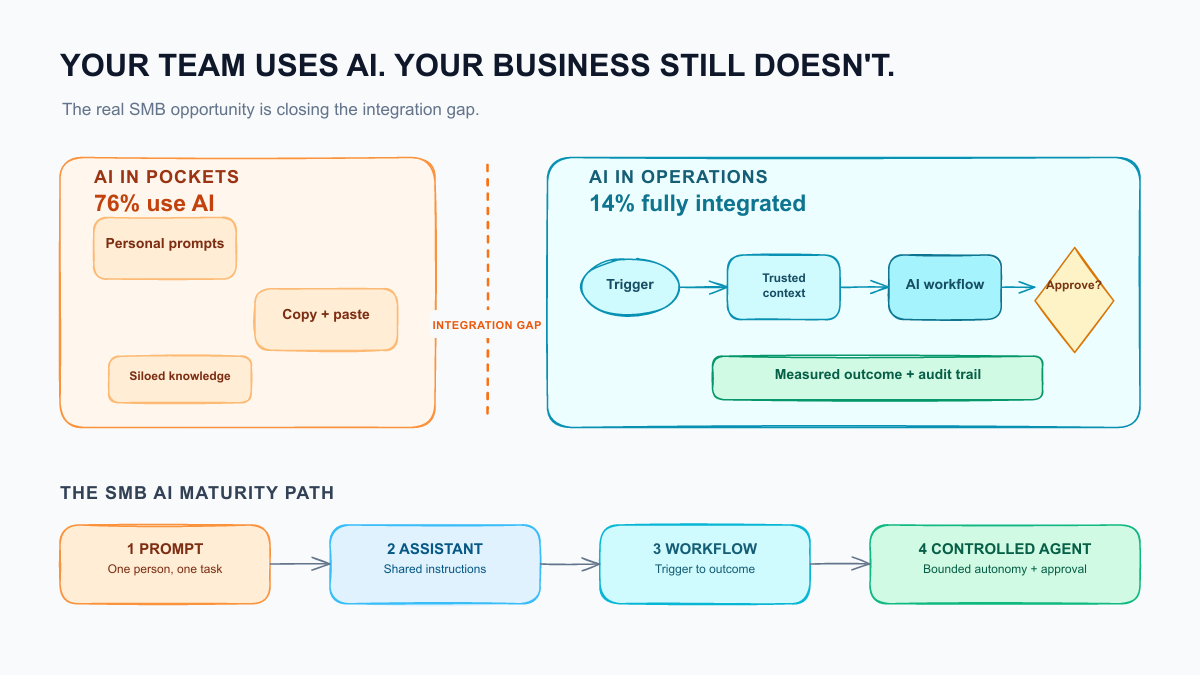
Your Team Uses AI. Your Business Still Doesn't.
Your marketing manager uses ChatGPT to draft posts.
Your sales rep asks Claude to research prospects. Your operations lead summarizes meetings with an AI note-taker. Someone in finance has built a prompt that cleans spreadsheet exports.
So your company uses AI. Right?
Technically, yes.
Operationally, probably not.
The distinction matters. An employee using AI can finish a task faster. A business using AI can move work from trigger to outcome without relying on one person to remember every step, copy every field, or paste every prompt.
That gap between individual usage and operational integration is now the biggest AI opportunity for small and medium-sized businesses.
It is also where most companies are stuck.
The 14% problem
Recent research appears contradictory until you look at what each survey actually measures.
In March 2026, a Goldman Sachs survey of 1,256 participants in its 10,000 Small Businesses program found that 76% were using AI. Of those users, 93% reported a positive impact. But only 14% said AI was fully embedded in core operations (source).
The US Census Bureau tells a more conservative story. Its nationally representative Business Trends and Outlook Survey found that overall business AI usage hovered between 17% and 20% from December 2025 to May 2026. Among firms with four or fewer employees, usage remained below 20% (source).
These figures do not cancel each other out. They describe different samples and different definitions of "use."
One survey asks a group of growth-oriented small business owners whether they use AI at all. The other measures recent use across the wider business population. Both point to the same conclusion:
AI experimentation has spread much faster than AI integration.
The OECD's 2026 D4SME research makes the gap even clearer. Among surveyed businesses, 75% used off-the-shelf AI applications, but only 5% used customized AI and 3.6% deployed agentic AI. More than half used AI only for isolated tasks, while 19% applied it across multiple functions or the whole business (source).
Most companies do not have an AI adoption problem anymore.
They have an integration problem.
Four levels of SMB AI maturity
The easiest way to diagnose that problem is to stop asking, "Do we use AI?" and ask, "How does work move when AI is involved?"
Level 1: Prompt
One person opens a chat window and asks for an output.
Examples:
- Draft a follow-up email.
- Summarize these meeting notes.
- Turn this article into five social posts.
- Explain this spreadsheet.
This is useful, cheap, and easy to adopt. But the business captures almost none of the learning. The prompt stays in an employee's browser history, the output must be moved manually, and the process disappears when that employee leaves.
Level 2: Assistant
The AI has reusable instructions, files, or access to a limited set of company knowledge.
Examples:
- A sales assistant that knows the ICP and offer.
- A support assistant grounded in approved help articles.
- A custom content assistant trained on the brand voice.
- A finance assistant that understands the weekly reporting format.
Results become more consistent, but people still initiate the work and carry the output into the next system.
Level 3: Workflow
A business event triggers a defined sequence across systems.
For example:
- A lead submits a form.
- The workflow enriches the company and contact.
- AI scores fit against written criteria.
- A qualified lead receives the right follow-up.
- The CRM is updated.
- Uncertain cases go to a human for review.
At this level, AI is no longer a destination. It is one component inside an operating process.
Level 4: Controlled agent
The system can choose among approved actions, gather additional context, and complete a bounded multi-step objective.
The important word is controlled.
A production agent should have:
- A narrow job and explicit success condition.
- Access only to the systems and records it needs.
- Spending, sending, and editing limits.
- Human approval for high-risk actions.
- Logs that show what it did and why.
- A fallback path when confidence is low.
Full autonomy is rarely the right target for an SMB. Reliable partial autonomy is usually more valuable.
Take the five-minute maturity test
Score each statement from 0 to 2:
- 0: No
- 1: Sometimes or partially
- 2: Yes, consistently
| Question | Score |
|---|---|
| Our most common AI tasks use shared instructions rather than personal prompts. | 0-2 |
| AI reads from an approved source of company knowledge. | 0-2 |
| At least one AI workflow starts automatically from a business event. | 0-2 |
| Outputs are written back to the CRM, help desk, project tool, or database. | 0-2 |
| Sensitive actions have a defined human approval step. | 0-2 |
| We can see failures, costs, and processing history in one place. | 0-2 |
| Every production workflow has an owner and a fallback procedure. | 0-2 |
| We measure a business outcome, not just AI usage. | 0-2 |
0-4: AI curious. Your team is experimenting, but the value depends on individual initiative.
5-9: AI assisted. You have reusable capabilities, but work still crosses systems manually.
10-13: Workflow ready. The foundation exists. Focus on connecting triggers, systems, and feedback.
14-16: Operational AI. You are running production workflows. Your next job is reliability and portfolio management, not buying more tools.
Why companies get stuck between assistant and workflow
The model is usually not the problem.
1. The process was never written down
You cannot automate "handle new leads" or "help with customer support." Those are departments, not workflows.
You can automate:
- Enrich every inbound lead within two minutes.
- Classify each new support ticket by topic and urgency.
- Draft an approved response for refund requests under a defined threshold.
- Reconcile yesterday's paid invoices against the accounting export.
A good automation begins with a visible trigger, a specific outcome, and rules for exceptions.
2. The context lives everywhere
AI quality depends on context: customer history, product rules, pricing, previous decisions, current inventory, approved claims, and the latest version of the SOP.
Anthropic's 2026 agent report identifies fragmented data and the difficulty of surfacing context as major constraints on more sophisticated deployments (source).
For an SMB, this does not require a giant data platform. It often means choosing a source of truth, cleaning the ten fields that matter, and giving the workflow access to the right records at the right time.
3. Nobody owns the workflow
Automations are employees made of software: they still need an owner, performance expectations, and maintenance.
If sales blames operations, operations blames the vendor, and the vendor blames the prompt, the workflow will quietly decay.
Give each production workflow one business owner. That person does not need to build it, but they must own the result.
4. The company tries to automate judgment first
Start by automating preparation around a decision:
- Gather the account history before the sales call.
- Extract invoice fields before finance approves payment.
- Classify the request before support chooses a response.
- Compare KPI changes before the owner decides what to do.
This creates value while keeping consequential judgment with a human.
5. Success is measured in hours saved
Time saved matters, but it is easy to exaggerate. If an automation saves three hours and creates two hours of checking, debugging, and duplicate work, the dashboard is lying.
Tie each workflow to one operational metric:
| Workflow | Better primary metric |
|---|---|
| Inbound lead handling | Median speed-to-lead |
| Lead enrichment | Qualified opportunities per rep |
| Support triage | Time to first useful response |
| Invoice follow-up | Days sales outstanding |
| Meeting follow-through | Actions completed by due date |
| Weekly reporting | Time from data close to decision brief |
What to delegate and what to approve
AI adoption becomes safer when you separate work by reversibility and consequence.
Delegate automatically
These actions are frequent, observable, and cheap to reverse:
- Reading and classifying inbound information.
- Extracting structured fields from documents.
- Enriching records from approved sources.
- Summarizing meetings and reports.
- Drafting internal briefs.
- Updating low-risk internal fields.
Require human approval
These actions affect a customer, employee, contract, or financial position:
- Sending a first outbound campaign.
- Issuing a refund or credit.
- Publishing external claims.
- Changing prices or contract language.
- Rejecting a candidate or customer request.
- Moving or deleting financial records.
Keep human-owned
These require accountability, empathy, or strategic judgment:
- Hiring and firing decisions.
- Sensitive customer escalations.
- Legal conclusions.
- Material financial commitments.
- Brand positioning.
- Exceptions that fall outside written policy.
The goal is not to remove people from every process. It is to place human attention where it changes the outcome.
OECD research supports that framing. Among SMEs using generative AI, 65% reported improved employee performance, while 35% said it helped them scale and 26% reported increased revenue. One third said it reduced employee or owner workload (source).
The strongest immediate case is augmentation with measurable operational leverage, not indiscriminate replacement.
A 30-day plan to close the integration gap
Do not begin with a company-wide AI transformation. Build one reliable loop, then repeat the pattern.
Week 1: Find the loop
List repeated processes in sales, delivery, support, finance, and operations.
For each process, record:
- Frequency per week.
- Minutes of human work per run.
- Systems touched.
- Error or delay cost.
- Whether the output is easy to review.
Choose one process that happens often, uses accessible data, and has a clear success metric. Our guide to seven practical AI automation tasks can help narrow the list.
Week 2: Define the contract
Write a one-page workflow contract:
- Trigger.
- Required inputs.
- Expected output.
- Approved actions.
- Prohibited actions.
- Human approval points.
- Exception path.
- Owner.
- Metric and baseline.
If this cannot fit on one page, the first version is too broad.
Week 3: Build the smallest production version
Connect the existing source of truth to the workflow. Use deterministic rules for predictable steps and AI only where interpretation is needed.
Do not make the agent decide what a simple if/then rule can decide more reliably.
Run historical examples through the workflow before turning it on. Include ugly cases, incomplete records, ambiguous messages, and known exceptions.
Week 4: Operate before expanding
Release to a small group. Review every run initially. Track:
- Completion rate.
- Human approval rate.
- Correction rate.
- Exception categories.
- Cost per successful outcome.
- Change in the business metric.
After two stable weeks, reduce review for low-risk cases. Then select the next workflow.
That is how AI becomes infrastructure: one accountable loop at a time.
Stop counting AI users
The number of employees with a ChatGPT, Claude, or Copilot account is not an AI strategy metric.
Neither is prompt volume.
Count production workflows. Count successful outcomes. Count exceptions. Count how quickly the company responds, delivers, collects, learns, and decides.
Your team may already use AI every day. That is a useful beginning.
But the competitive advantage appears when the knowledge in their prompts becomes a shared system, when the output reaches the next step without copy-paste, and when the business improves even on a day when the AI power user is not at their desk.
That is the difference between employees using AI and a business that actually runs better because of it.
If you want to identify the first workflow worth moving into production, JetAI Flow's AI automation services focus on practical, measurable systems with clear approvals and ownership—not another layer of disconnected AI tools.